
In Chapter 3, you learned how to give an AI chatbot up-to-date, relevant context so it can respond accurately. However, a production-ready chatbot must also sustain a back-and-forth conversation and remember prior interactions.
Because large language models are stateless, they do not retain previous prompts or responses. To simulate memory, an application must store conversation history and relevant context, then include that information in each new prompt. This added context enables the model to generate coherent, context-aware replies, as shown below.
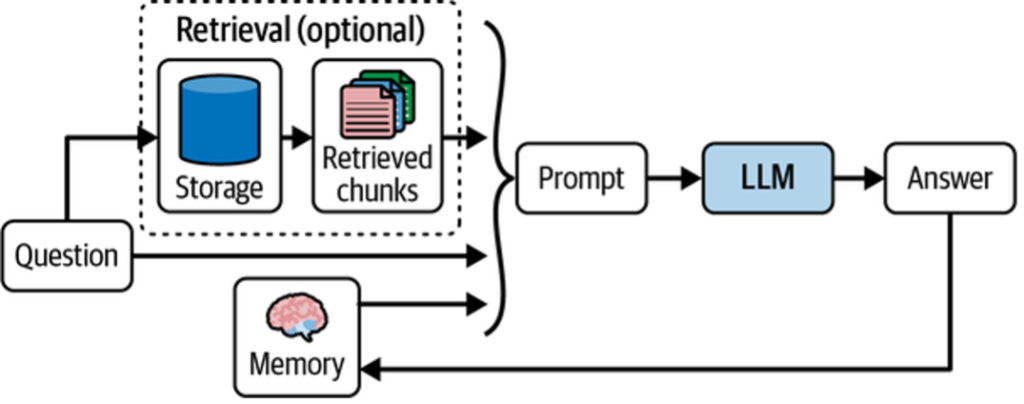
In this chapter, you’ll learn how to build such a memory system using LangChain’s built-in modules.
Table of Contents
Building a Chatbot Memory System
Any robust memory system is shaped by two core decisions:
- How state is stored
- How state is queried
A straightforward approach is to store and reuse the full history of chat interactions between the user and the model. In this setup, memory state is:
- Stored as a list of messages
- Updated by appending new messages after each turn
- Injected into the prompt to provide conversational context
Figure 2 illustrates this approach.

answers
Below is a simple LangChain example that demonstrates this pattern.
Python
from langchain_core.prompts import ChatPromptTemplate
from langchain_openai import ChatOpenAI

prompt = ChatPromptTemplate.from_messages([
    ("system", """You are a helpful assistant. Answer all questions to the best
of your ability."""),
    ("placeholder",
     "{messages}"),
])

model = ChatOpenAI()
chain = prompt | model

chain.invoke({
    "messages": [
        ("human","""Translate this sentence from English to French: I love
programming."""),
        ("ai", "J'adore programmer."),
        ("human", "What did you just say?"),
    ],
})
The output:
I said, « J’adore programmer, » which means « I love programming » in French.
By including prior conversation in the prompt, the model can answer follow-up questions coherently.
While effective, this approach becomes limiting in production environments. At scale, you must address additional challenges:
- Updating memory atomically after each interaction
- Persisting memory in durable storage (e.g., a database)
- Controlling which messages are stored and reused
- Inspecting and modifying memory outside LLM calls
To address these needs, the next sections introduce more advanced tooling that will support this chapter and those that follow.
Introducing LangGraph
For the rest of this chapter and those that follow, we’ll use LangGraph, an open source library from LangChain. LangGraph is designed to help developers build multiactor, multistep, stateful applications—referred to as graphs.

LLM applications become far more powerful when multiple actors collaborate. For example, an LLM prompt excels at reasoning and planning, while tools like search engines specialize in retrieving up-to-date information. Applications such as Perplexity and Arc Search demonstrate how combining these components unlocks new capabilities.
As with human teams, multiactor systems require coordination. A coordination layer is needed to:
- Define actors (graph nodes) and how they pass work between one another (edges)
- Schedule execution—potentially in parallel—with deterministic results
Figure 4-4. From multiactor to multistep applications
When actors hand work off to one another, execution unfolds across discrete steps. Modeling this explicitly makes it possible to track ordering, repetition, and termination, until the final result is produced.
Figure 4-5. From multistep to stateful applications
To support multistep execution, applications must track state. Rather than embedding state inside individual actors, LangGraph centralizes it so all actors can read and update a shared state. This enables:
- State snapshotting and persistence
- Pausing and resuming execution
- Human-in-the-loop workflows
A LangGraph application consists of:
- State: Shared data received, modified, and produced during execution
- Nodes: Functions that read and update state
- Edges: Fixed or conditional paths that determine execution flow
LangGraph also provides visualization and debugging tools and supports deployment at production scale.
If LangGraph is not already installed, you can install it with:
Python
pip install langgraphTo introduce these concepts, the next section walks through a simple chatbot built with LangGraph. While minimal, it demonstrates the core architecture used throughout the rest of the book.
Creating a StateGraph
A LangGraph application begins by defining a shared state and how it is updated. In this example, the state consists of a list of messages that will grow over time as the conversation progresses.
from typing import Annotated, TypedDict
from langgraph.graph import StateGraph, START, END
from langgraph.graph.message import add_messages

class State(TypedDict):
    # Messages have the type "list". The `add_messages`
    # function in the annotation defines how this state should
    # be updated (in this case, it appends new messages to the
    # list, rather than replacing the previous messages)
    messages: Annotated[list, add_messages]

builder = StateGraph(State)
Each node in the graph receives the current state and returns updates to it. Below, the node makes a single LLM call and appends the model’s response to the message history.
from langchain_openai import ChatOpenAI

model = ChatOpenAI()

def chatbot(state: State):
    answer = model.invoke(state["messages"])
    return {"messages": [answer]}

# The first argument is the unique node name
# The second argument is the function or Runnable to run
builder.add_node("chatbot", chatbot)
Edges define execution flow. Here, the graph starts at the chatbot node and ends immediately after it runs.
builder.add_edge(START, 'chatbot')
builder.add_edge('chatbot', END)

graph = builder.compile()
You can visualize the resulting graph structure:
graph.get_graph().draw_mermaid_png()
Finally, run the graph by passing input that matches the defined state shape. The graph streams the updated state after each step.
input = {"messages": [HumanMessage('hi!')]}

for chunk in graph.stream(input):
    print(chunk)
This simple graph demonstrates the core LangGraph concepts: shared state, nodes as units of work, and edges that define execution order.
Adding Memory to StateGraph
LangGraph provides built-in persistence through checkpointers, which save and restore graph state between executions. To enable memory, recompile the graph with a checkpointer. LangGraph includes adapters for in-memory storage, SQLite, and Postgres.
from langgraph.checkpoint.memory import MemorySaver

graph = builder.compile(checkpointer=MemorySaver())
With a checkpointer attached, the graph automatically saves state after each step and reloads it on subsequent invocations, rather than starting from an empty state.
Threads identify independent conversation histories. Reusing the same thread allows the graph to recall prior interactions.
thread1 = {"configurable": {"thread_id": "1"}}

result_1 = graph.invoke(
    { "messages": [HumanMessage("hi, my name is Jack!")] },
    thread1
)
# { "chatbot": { "messages": [AIMessage("How can I help you, Jack?")] } }

result_2 = graph.invoke(
    { "messages": [HumanMessage("what is my name?")] },
    thread1
)
# { "chatbot": { "messages": [AIMessage("Your name is Jack")] } }
On the second invocation, the graph has access to messages saved during the first run, enabling true conversational memory.
You can also inspect the stored state for a given thread:
graph.get_state(thread1)
And you can update the state directly, without invoking the graph:
graph.update_state(thread1, [HumanMessage('I like LLMs!')])
This updated state will be incorporated automatically the next time the graph is run for the same thread.
Modifying Chat History
Chat history often needs adjustment before being sent to an LLM. Common techniques include trimming, filtering, and merging messages. Trimming is especially important to stay within model context limits and to avoid distracting the model with unnecessary information.
LangChain provides a built-in helper for trimming messages based on token limits and configurable strategies.
from langchain_core.messages import SystemMessage, trim_messages
from langchain_openai import ChatOpenAI

trimmer = trim_messages(
    max_tokens=65,
    strategy="last",
    token_counter=ChatOpenAI(model="gpt-4o"),
    include_system=True,
    allow_partial=False,
    start_on="human",
)

messages = [
    SystemMessage(content="you're a good assistant"),
    HumanMessage(content="hi! I'm bob"),
    AIMessage(content="hi!"),
    HumanMessage(content="I like vanilla ice cream"),
    AIMessage(content="nice"),
    HumanMessage(content="what's 2 + 2"),
    AIMessage(content="4"),
    HumanMessage(content="thanks"),
    AIMessage(content="no problem!"),
    HumanMessage(content="having fun?"),
    AIMessage(content="yes!"),
]

trimmer.invoke(messages)
This approach ensures that only the most relevant recent messages are included in the prompt, while preserving conversational structure and important system instructions.
Filtering Messages
As chat histories grow and include messages from multiple actors or subchains, filtering becomes essential. LangChain provides helpers to filter messages by type, name, or ID.
from langchain_core.messages import (
    AIMessage,
    HumanMessage,
    SystemMessage,
    filter_messages,
)

messages = [
    SystemMessage("you are a good assistant", id="1"),
    HumanMessage("example input", id="2", name="example_user"),
    AIMessage("example output", id="3", name="example_assistant"),
    HumanMessage("real input", id="4", name="bob"),
    AIMessage("real output", id="5", name="alice"),
]

filter_messages(messages, include_types="human")
Filtering can also exclude specific users or message IDs, or combine inclusion and exclusion rules.
filter_messages(messages, exclude_names=["example_user", "example_assistant"])
filter_messages(
    messages,
    include_types=[HumanMessage, AIMessage],
    exclude_ids=["3"]
)
The filter helper can be composed directly into a chain.
model = ChatOpenAI()
filter_ = filter_messages(exclude_names=["example_user", "example_assistant"])
chain = filter_ | model
Merging Consecutive Messages
Some models do not allow consecutive messages of the same type. LangChain provides a utility to merge adjacent messages automatically.
from langchain_core.messages import (
    AIMessage,
    HumanMessage,
    SystemMessage,
    merge_message_runs,
)

messages = [
    SystemMessage("you're a good assistant."),
    SystemMessage("you always respond with a joke."),
    HumanMessage(
        [{"type": "text", "text": "i wonder why it's called langchain"}]
    ),
    AIMessage(
        HumanMessage("and who is harrison chasing anyway"),
        '''Well, I guess they thought "WordRope" and "SentenceString" just
        didn\'t have the same ring to it!'''
    ),
    AIMessage("""Why, he's probably chasing after the last cup of coffee in the
    office!"""),
]

merge_message_runs(messages)
This utility can also be composed into a chain.
model = ChatOpenAI()
merger = merge_message_runs()
chain = merger | model
These tools make it easier to keep chat history clean, compatible, and optimized for downstream model calls.
Summary
This chapter introduced the core concepts behind adding memory to an AI chatbot. You learned how to store and update conversation history automatically using LangGraph, enabling context-aware, multi-turn interactions. The chapter also covered practical techniques for managing chat history—such as trimming, filtering, and merging messages—to keep prompts efficient and effective.
In Chapter 5, you’ll build on this foundation by enabling your chatbot to make decisions, choose actions, and reflect on its previous outputs.