
In AI, the concept of agents traces back to long-established principles. As defined by Stuart Russell and Peter Norvig in their textbook Artificial Intelligence (Pearson, 2020), an agent is essentially « something that acts. » However, this simple definition involves several important implications:
- Acting entails the ability to decide on an action.
- Decision-making requires more than one course of action to choose from; without options, a decision feels void.
- To make decisions, the agent must have access to environmental data—anything beyond its internal setup.
An LLM-based agent, therefore, utilizes LLMs to evaluate and select from multiple action paths, using real-time context about the world or a desired future state. This dynamic is typically achieved by integrating two prompting techniques from the initial chapters:
- Tool Calling:
- Include a set of external functions (or tools) the LLM can leverage. This enables the agent to make informed decisions.
- Provide precise instructions on output formatting, detailing the tool selection process. We will dive into a specific example shortly.
- Chain-of-Thought:
- LLMs exhibit improved decision-making when given directions to break down intricate problems into smaller, sequential steps.
- Encourage this approach through commands like « think step by step » or by showcasing samples of complex questions dissected into a stepwise solution.
Example Prompt: Tool Calling & Chain-of-Thought
Below is a prompt demonstrating both techniques:
Tools:
search: this tool accepts a web search query and returns the top results.
calculator: this tool accepts math expressions and returns their result.

If you want to use tools to arrive at the answer, output the list of tools and
inputs in CSV format, with the header row: tool,input.

Think step by step; if you need to make multiple tool calls to arrive at the
answer, return only the first one.

How old was the 30th president of the United States when he died?

tool,inputRunning the Example
When processed using the gpt-3.5-turbo model with temperature set to 0 (ensuring adherence to the CSV format) and newline as the stop sequence, the output typically results in:
search,30th president of the United StatesThe latest LLM versions and chat models are optimized for these applications, lessening the need for explicit prompts. Future works may incorporate advanced sequences without additional guidance.
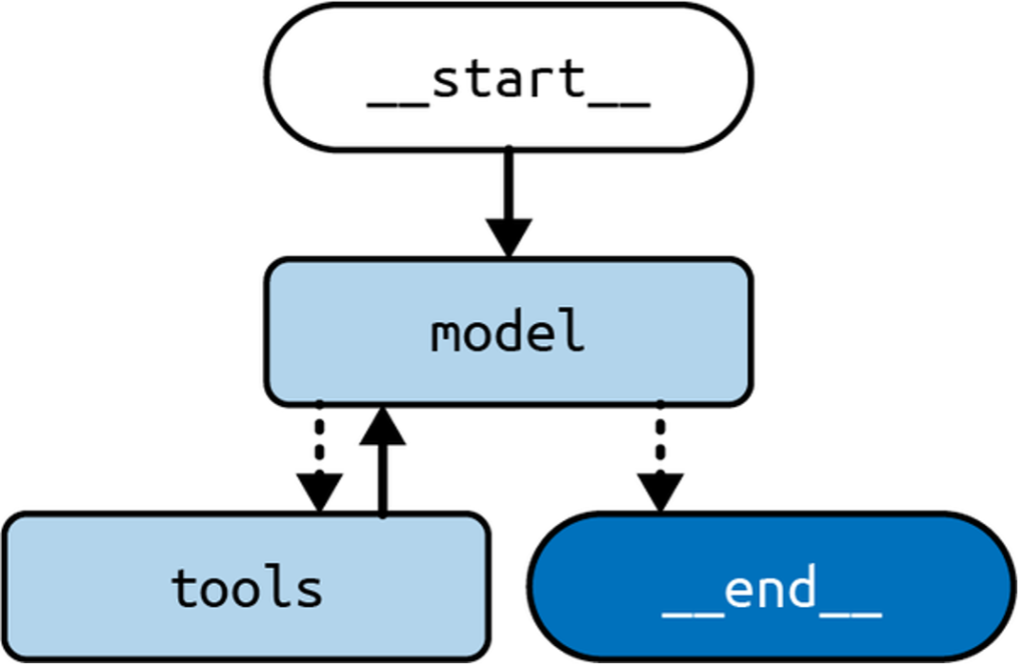
As the field evolves, so do the capabilities and implementations of intelligent agents, pushing the boundaries of what they can achieve in real-world applications.
Table of Contents
The Plan-Do Loop
Think of a traditional program loop: it runs a block of code repeatedly until a predefined condition is met. An AI agent works on a similar principle, but with a key difference: a Large Language Model (LLM) acts as the « brain » that controls the loop. Instead of a simple while condition, the LLM decides, step-by-step, what to do next and, crucially, when to stop.
Each iteration of the agent’s loop typically follows this pattern:
- Plan: The LLM analyzes the goal and available tools (like a search engine or calculator) to decide on the next best action.
- Execute: The chosen tool is run with a specific input (e.g., a search query).
- Observe: The result from the tool is fed back to the LLM.
- Repeat or Conclude: The LLM evaluates the new information. Does it have the final answer, or does it need to take another step? The loop continues until the LLM decides the task is complete.
A Practical Walkthrough: Calculating a President’s Age at Death
Let’s see this loop in action with a concrete goal: « How old was the 30th president of the United States when he died? »
Our agent has access to three tools:
search: For web searches.calculator: For math expressions.output: A special tool to deliver the final answer and end the loop.
Iteration 1: Gathering Facts
- LLM’s Plan: First, we need to identify the president and find their birth and death dates.
- Action: The LLM calls the
searchtool.tool, input search, "30th president of the United States" - Result: The tool returns: « Calvin Coolidge (born… July 4, 1872 – January 5, 1933)… »
Iteration 2: Performing the Calculation
- LLM’s Plan: We have the dates (1872 and 1933). Now we need to calculate the difference.
- Action: The LLM calls the
calculatortool.tool, input calculator, "1933 - 1872" - Result: The calculator returns
61.
Iteration 3: Delivering the Final Answer
- LLM’s Plan: The calculation is complete. We have the final answer and can end the process.
- Action: The LLM calls the special
outputtool.tool, input output, 61 - Result: The loop stops. The agent’s final output is 61.
Key Components of the Architecture
This example highlights two critical additions that make an agent work:
- The
outputTool: This is the LLM’s way of signaling, « My work is done, here is the answer. » It provides a clear stop condition for the loop. - Observing Tool Results: By seeing the output of each tool (the biography, the number 61), the LLM gets the context it needs to plan the next logical step, creating a coherent chain of reasoning.
This pattern is formally known as the ReAct (Reason + Act) framework, introduced by Shunyu Yao et al. It empowers an LLM to dynamically reason about a process, take actions using tools, and decide when to terminate.
In the coming sections, we’ll explore how to optimize this architecture using a chat model and LangGraph (a library for building stateful, multi-step applications), building on concepts like the email assistant from Chapter 5.
Building a LangGraph Agent
In this example, we’ll integrate a search tool, DuckDuckGo, and a calculator tool into our agent architecture using Python. To start, you need to install the duckduckgo-search library:
pip install duckduckgo-searchOnce the dependency is ready, let’s dive into the implementation:
import ast
from typing import Annotated, TypedDict

from langchain.tools import DuckDuckGoSearchRun
from langchain.tools import tool
from langchain import ChatOpenAI

from langgraph.graph import START, StateGraph
from langgraph.graph.message import add
from langgraph.prebuilt import ToolNode, tools_condition

@tool
def calculator(query: str) -> str:
    """A simple calculator tool. Input should be a mathematical expression."""
    return ast.literal_eval(query)

search = DuckDuckGoSearchRun()  # Initialize DuckDuckGo search tool
tools = [search, calculator]
model = ChatOpenAI(temperature=0.1).bind_tools(tools)

class State(TypedDict):
    messages: Annotated[list, add]

def model_node(state: State) -> State:
    res = model.invoke(state["messages"])
    return {"messages": res}

builder = StateGraph(State)
builder.add("model", model_node)
builder.add("tools", ToolNode(tools))
builder.add(START, "model")
builder.add_conditional_edges("model", tools_condition)
builder.add_edge("tools", "model")

graph = builder.compile()Key Points of the Architecture
- Tools: We’ve integrated a search tool and a simple calculator. You can extend this by adding more tools.
- Graph Nodes: The
ToolNodehandles execution and integrates tools seamlessly, also managing exceptions gracefully. - Conditional Edges: The architecture uses conditional logic to decide between continuing the loop or ending the graph, providing dynamic decision-making.
Execution Example
Now, let’s see how the agent processes a question about the 30th President of the United States:
from langchain.messages import HumanMessage

input = {
    "messages": [
        HumanMessage("How old was the 30th president of the United States when he died?")
    ]
}
for chunk in graph.stream(input):
    print(chunk)
The output:
{
  "model": {
    "messages": [
      {
        "type": "AIMessage",
        "content": "",
        "tool_calls": [
          {
            "name": "duckduckgo_search",
            "args": {
              "query": "30th president of the United States age at death"
            },
            "id": "call_ZWRbPmjvo0fYkwyo4HCYUsar",
            "type": "tool_call"
          }
        ]
      }
    ]
  },
  "tools": {
    "messages": [
      {
        "type": "ToolMessage",
        "name": "duckduckgo_search",
        "tool_call_id": "call_ZWRbPmjvo0fYkwyo4HCYUsar",
        "content": "Calvin Coolidge (born July 4, 1872, Plymouth, Vermont, U.S.—died January 5, 1933, Northampton, Massachusetts) was the 30th president of the United States (1923-29). Coolidge acceded to the presidency after the death in office of Warren G. Harding, just as the Harding scandals were coming to light."
      }
    ]
  },
  "final_answer": {
    "model": {
      "messages": [
        {
          "type": "AIMessage",
          "content": "Calvin Coolidge, the 30th president of the United States, died on January 5, 1933, at the age of 60."
        }
      ]
    }
  }
}
Output Explanation:
- Model Node: Determines when to call the DuckDuckGo tool.
- Tool Node: Executes the search tool and provides the required information.
- Loop: The process loops back to refine the response until a satisfactory answer is achieved.
This example illustrates how the agent architecture flexibly integrates various tools to process complex queries. Next, we’ll explore how to customize this architecture further with extended planning and tool adjustment techniques.
Always Calling a Tool First
In the standard agent architecture, the Large Language Model (LLM) is tasked with the decision-making process to determine which tool to call next. This setup offers significant adaptability, tailoring each application response to the specific user query. However, this flexibility introduces unpredictability. As a developer, you might know better which tool should always be prioritized, such as beginning with a search tool. Implementing this can enhance your application by:
- Reducing Latency: It skips the initial LLM call needed to decide on the search tool.
- Preventing Errors: Stops the LLM from mistakenly bypassing the search tool for certain queries.
If your application doesn’t have a strict order of operations, enforcing one might actually degrade its performance.
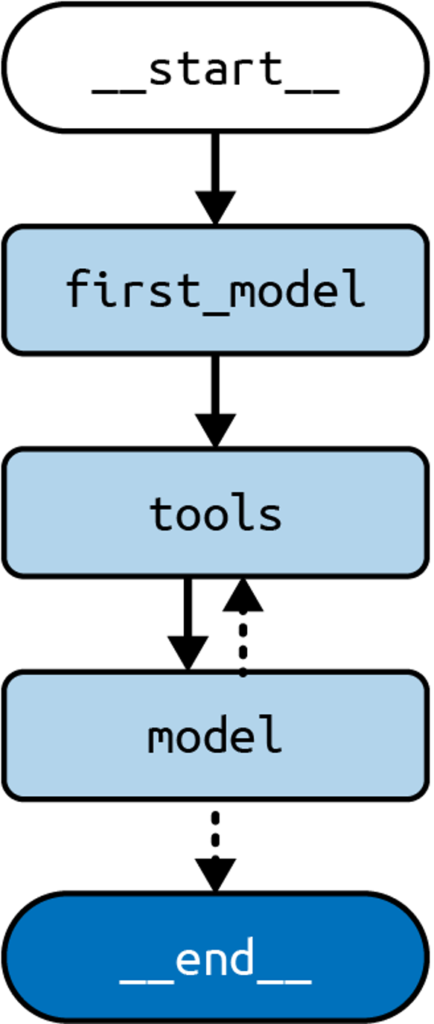
Here’s how to ensure a specific tool is always called first using Python:
import ast
from typing import Annotated, TypedDict
from uuid import uuid4
from langchain.tools import DuckDuckGoSearchRun
from langchain.messages import AIMessage, HumanMessage, ToolCall
from langchain.tools import tool
from langchain import ChatOpenAI
from langgraph.graph import START, StateGraph
from langgraph.graph.message import add
from langgraph.prebuilt import ToolNode, tools_condition

@tool
def calculator(query: str) -> str:
    """A simple calculator tool. Input should be a mathematical expression."""
    return ast.literal_eval(query)

search = DuckDuckGoSearchRun()
tools = [search, calculator]
model = ChatOpenAI(temperature=0.1).bind_tools(tools)

class State(TypedDict):
    messages: Annotated[list, add]

def model_node(state: State) -> State:
    res = model.invoke(state["messages"])
    return {"messages": res}

def first(state: State) -> State:
    query = state["messages"][-1].content
    search_call = ToolCall(
        name="DuckDuckGoSearchRun", args={"query": query}, id=uuid4().hex
    )
    return {"messages": AIMessage(content="", tool_calls=[search_call])}

builder = StateGraph(State)
builder.add("first", first)
builder.add("model", model_node)
builder.add("tools", ToolNode(tools))
builder.add(START, "first")
builder.add_edge("first", "tools")
builder.add_conditional_edges("model", tools_condition)
builder.add_edge("tools", "model")

graph = builder.compile()Key Changes:
- Begin by invoking
first, which bypasses the LLM and creates a direct tool call to the search engine using the user’s message. This contrasts with the former method, which had the LLM generate this call. - Following
first, we progress totoolsand then to the agent node, as before.
Here’s some sample output demonstrating this process:
input = {
    "messages": [
        HumanMessage("How old was the 30th president of the United States when he died?")
    ]
}
for chunk in graph.stream(input):
print(chunk)Output:
{
    "first": {
        "messages": AIMessage(
            content="",
            tool_calls=[
                {
                    "name": "DuckDuckGoSearchRun",
                    "args": {
                        "query": "How old was the 30th president of the United States when he died?"
                    },
                    "id": "9ed4328dcdea4904b1b54487e343a373",
                    "type": "tool_call"
                }
            ],
        )
    }
}
{
    "tools": {
        "messages": [
            ToolMessage(
                content="Calvin Coolidge (born July 4, 1872, Plymouth, Vermont, U.S.—died January 5, 1933, Northampton, Massachusetts)...",
                tool_call_id="9ed4328dcdea4904b1b54487e343a373"
            )
        ]
    }
}
{
    "model": {
        "messages": AIMessage(
            content="Calvin Coolidge, the 30th president of the United States, was born on July 4, 1872, and died on January 5, 1933... Coolidge was 61 years old when he died."
        )
    }
}This approach skips the preliminary LLM call, starting instead at the first node which directly returns the tool call for the search tool, then transitions through the previous flow to generate the final output.
Stay tuned for how to handle multiple tools within your LLM-driven application!
Dealing with Many Tools
Large Language Models (LLMs) have limitations, particularly when dealing with multiple choices or excessive information. This challenge extends to selecting the right actions when many tools are available. To improve performance, reduce the number of selectable tools. But how do you manage this if numerous tools are necessary for varied user queries?
The RAG Solution
An effective strategy is to employ a Retrieval-Augmented Generation (RAG) step. This preselects the most relevant tools for a given query, presenting the LLM with a manageable subset. This approach not only enhances decision-making but also reduces the costs associated with longer prompts in commercial LLMs. However, this RAG step introduces latency and should be implemented when performance issues arise due to an excess of tools.
Implementing RAG in Python
Below is a Python implementation that exemplifies this approach:
import ast
from typing import Annotated, TypedDict
from langchain.tools import DuckDuckGoSearchRun
from langchain.documents import Document
from langchain.messages import HumanMessage
from langchain.tools import tool
from langchain.vectorstores.in import InMemoryVectorStore
from langchain import ChatOpenAI, OpenAIEmbeddings
from langgraph.graph import START, StateGraph
from langgraph.graph.message import add
from langgraph.prebuilt import ToolNode, tools_condition

@tool
def calculator(query: str) -> str:
    """A simple calculator tool. Input should be a mathematical expression."""
    return ast.literal_eval(query)

search = DuckDuckGoSearchRun()
all_tools = [search, calculator]

embeddings = OpenAIEmbeddings()
model = ChatOpenAI(temperature=0.1)

# Create a vector store of tool descriptions for retrieval
vectorstore = InMemoryVectorStore.from_documents(
    [Document(page_content=tool.description, metadata={"name": tool.name}) for tool in all_tools],
    embeddings,
)
tool_retriever = vectorstore.as_retriever()

class State(TypedDict):
    messages: Annotated[list, add]
    selected_tools: list

def model_node(state: State) -> State:
    # Bind only the selected tools to the model
    bound_model = model.bind_tools(state["selected_tools"])
    res = bound_model.invoke(state["messages"])
    return {"messages": res}

def select_tools(state: State) -> State:
    query = state["messages"][-1].content
    retrieved_docs = tool_retriever.invoke(query)
    # Retrieve the actual tool objects based on retrieved names
    selected = [tool for tool in all_tools if tool.name in [doc.metadata["name"] for doc in retrieved_docs]]
    return {"selected_tools": selected}

builder = StateGraph(State)
builder.add("select", select_tools)
builder.add("model", model_node)
builder.add("tools", ToolNode(all_tools))
builder.add(START, "select")
builder.add_edge("select", "model")
builder.add_conditional_edges("model", tools_condition)
builder.add_edge("tools", "model")

graph = builder.compile()This code defines a system where tools are preselected based on query relevance, using RAG to streamline the decision-making process.
Example Output
Here’s how the system processes a query about the 30th president of the United States:
input = {
  "messages": [
    HumanMessage("""How old was the 30th president of the United States when he died?""")
  ]
}
for chunk in graph.stream(input):
print(chunk)Expected Outputs:
- Selection Phase:
{
    "select": {
        "selected_tools": [DuckDuckGoSearchRun, calculator]
    }
}- Model Phase:
{
    "model": {
        "messages": AIMessage(
            content="",
            tool_calls=[
                {
                    "name": "DuckDuckGoSearchRun",
                    "args": {
                        "query": "30th president of the United States"
                    },
                    "id": "9ed4328dcdea4904b1b54487e343a373",
                    "type": "tool_call",
                }
            ],
        )
    }
}- Tool Interaction:
{
    "tools": {
        "messages": [
            ToolMessage(
                content="Calvin Coolidge (born July 4, 1872, Plymouth, Vermont, U.S.—died January 5, 1933, Northampton, Massachusetts) was the 30th president of the United States (1923-29). Coolidge acceded to the presidency after the death in office of Warren G. Harding, just as the Harding scandals were coming to light....",
                tool_call_id="9ed4328dcdea4904b1b54487e343a373",
            )
        ]
    }
}- Final Response:
{
    "model": {
        "messages": AIMessage(
            content="Calvin Coolidge, the 30th president of the United States, was born on July 4, 1872, and died on January 5, 1933. To calculate his age at the time of his death, we can subtract his birth year from his death year. Age at death = Death year - Birth year = 1933 - 1872 = 61 years. Coolidge was 61 years old when he died.",
        )
    }
}By querying the retriever first, the system selects the most relevant tools efficiently, maintaining the core architecture’s integrity while optimizing resource usage.
Summary
In this section, we explored the concept of agency in LLM (Large Language Model) applications. We discussed how to make an LLM agentic by enabling it to make decisions using external information and choose between multiple options.
We examined a standard agent architecture created with LangGraph and explored two practical extensions:
- How to always prioritize calling a specific tool first.
- Handling scenarios where multiple tools are available.
Looking Ahead
In the next chapter, we’ll delve into additional extensions to enhance the agent architecture.