
This chapter introduces chatbots: what they are, how they evolved, and how modern systems like ChatGPT are built. We focus on state-of-the-art approaches using Large Language Models (LLMs) and discuss their safe and effective use, including in regulated domains such as medicine and law.
A key requirement for effective chatbots is proactive, contextual communication, which relies on mechanisms for memory and retrieval. This chapter emphasizes retrieval-augmented language models (RALMs), vector storage, and embeddings to improve response accuracy and faithfulness to source information and conversation history.
We cover the technical foundations needed to implement these systems with LangChain, including document loading, vector databases, embeddings, and conversational memory. We also address an important reputational and legal concern: moderation. Chatbot responses must avoid harmful or inappropriate content, and LangChain provides moderation chains to support this.
Table of Contents
We begin with an overview of chatbots and the current state of the technology.
What is a chatbot?
A chatbot is an AI system that interacts with users via natural language to provide information, support, and task automation. Chatbots are used across industries to enable efficient, scalable, and personalized user interactions.
Chatbots can:
- Automate repetitive tasks
- Provide instant, 24/7 responses
- Improve efficiency and customer experience
- Streamline business processes
They rely on natural language processing (NLP) and machine learning to interpret user intent and generate appropriate responses. Chatbots may operate through text-based interfaces or voice-driven applications.
Common use cases
In customer service, chatbots are widely used for:
- Frequently asked questions
- Product recommendations
- Order processing and payments
- Basic issue resolution
Additional use cases include:
- Appointment Scheduling: Booking meetings, reservations, and calendar management
- Information Retrieval: Weather, news, stock prices, and FAQs
- Virtual Assistants: Reminders, messaging, and task management
- Language Learning: Interactive conversation and practice
- Mental Health Support: Emotional support and therapeutic dialogue
- Education: Virtual tutors, assessment, and personalized learning
- HR and Recruitment: Candidate screening and interview scheduling
- Entertainment: Games, quizzes, and storytelling
- Law: Basic legal guidance, research assistance, and document drafting
- Medicine: Symptom checking, medical information, and clinical decision support
These examples illustrate how chatbot technology continues to expand, making information more accessible and providing valuable first-line support across domains.
What’s the state-of-the-art?
The Turing Test, proposed by Alan Turing, is one of the earliest benchmarks for artificial intelligence. It evaluates whether a computer can produce responses indistinguishable from those of a human during a text-based conversation. While its relevance is debated today, the test remains a foundational concept for discussing machine intelligence and human–computer interaction.
In its original form, the test involves three participants: a human questioner, a human respondent, and a computer respondent. All are isolated, and the questioner must determine which respondent is human after a series of questions. If the computer cannot be reliably identified, it is said to have passed the test.
Early chatbots and criticism
One of the first programs to challenge the test was ELIZA, developed by Joseph Weizenbaum in 1966. ELIZA simulated a psychotherapist using simple pattern matching and open-ended questions. Although designed partly as a critique of AI’s limitations, it became a milestone by creating the illusion of understanding. However, ELIZA had no real comprehension, limited domain knowledge, no long-term memory, and no ability to learn.
Over time, the Turing Test faced criticism. Early systems could succeed only when questions were constrained to narrow domains or simple yes/no answers. Open-ended dialogue exposed their limitations. Philosopher John Searle argued that symbol manipulation alone does not constitute true understanding, making Turing-style imitation insufficient as a measure of intelligence.
As a result, many researchers shifted focus away from deception-based tests toward improving useful, intuitive, and efficient human–machine interaction, especially through conversational interfaces.
Notable developments
In 1972, PARRY, a chatbot simulating a patient with schizophrenia, introduced personality modeling and emotional state tracking. In a 1979 experiment, psychiatrists struggled to reliably distinguish PARRY from real patients, highlighting both progress and ambiguity in AI evaluation.
The Loebner Prize, awarded annually since 1990, follows the Turing Test format to recognize the most human-like chatbot. While influential, critics argue it emphasizes showmanship over meaningful intelligence.
IBM Watson marked another milestone by combining NLP, machine learning, and large-scale data ingestion. Its 2011 victory on Jeopardy! demonstrated AI’s ability to process and reason over complex natural language questions. Watson has since been applied in healthcare, finance, research, and even culinary innovation.
In 2018, Google Duplex made a real phone call to book a hair appointment, convincingly mimicking human speech. Although not a formal Turing Test, it is often cited as a modern equivalent due to its realism.
Modern conversational AI
ChatGPT, developed by OpenAI and launched in November 2022, represents a major leap in conversational AI. Built on GPT-3.5 and GPT-4, it enables coherent, flexible, and context-aware dialogue across a wide range of topics. Users can guide conversations by specifying tone, style, format, and level of detail.
ChatGPT is widely seen as a game changer due to its conversational fluency and accessibility. While it may outperform previous systems in Turing-like settings, it can still be misled by nonsensical prompts and may fail under strict interpretations of the test.
Examples of chatbots
- ELIZA: Early rule-based chatbot using pattern matching
- Siri: Apple’s voice-based assistant
- Alexa: Amazon’s personal assistant for smart homes and services
- Google Assistant: Task-oriented and information-driven assistant
- Mitsuku: Multi-time Loebner Prize winner known for conversational depth
Beyond the Turing Test
A major limitation of the Turing Test is its focus on imitation rather than capability. Modern evaluation increasingly relies on benchmarks, exams, and task-based assessments that measure reasoning, reliability, and domain performance.
Current research focuses on understanding the limits of large language models (LLMs) such as GPT-4. While LLMs excel at language tasks, they often struggle with logical reasoning, abstract concepts, and visual puzzles. They generate plausible text based on statistical patterns rather than true understanding.
This research has important real-world implications, especially in high-stakes domains like medicine and law, where knowing when and how AI may fail is critical.
ChatGPT reduces hallucinations compared to earlier models but can still present incorrect information confidently. As a result, context handling, memory, and retrieval mechanisms are essential for improving accuracy, faithfulness, and trustworthiness in conversational systems—topics explored in the next section.
Context and Memory
Context and memory are core components of effective chatbot design. They enable chatbots to maintain conversational continuity, handle multi-turn dialogue, and store and recall information over time. Together, they condition chatbot responses for accuracy (correctness in the moment) and faithfulness (consistency across interactions).
Their importance mirrors human conversation: without remembering past exchanges or understanding broader context, dialogue becomes fragmented and prone to misunderstanding, resulting in a poor user experience.
Contextual understanding allows a chatbot to consider the full conversation and relevant background, not just the most recent user message. This holistic view enables more natural, coherent, and human-like interactions.
Memory retention supports faithfulness by ensuring consistency. A chatbot that remembers facts from earlier interactions—such as preferences or user-provided details—can deliver more personalized and reliable responses.
For example, if a user says, “Show me the cheapest flights,” followed by “How about hotels in that area?”, a context-aware chatbot understands that “that area” refers to the flight destination. Without context, the second request becomes ambiguous.
Similarly, a lack of memory leads to inconsistencies. If a user shares their name in one conversation and the chatbot forgets it later, the interaction feels impersonal and unnatural.
Without strong context and memory mechanisms, chatbots appear rigid and disconnected. With them, interactions become more accurate, personable, and satisfying—key requirements for advanced human–computer dialogue.
A defining feature of LLM-based chatbots is that they can go beyond responding to explicit requests and engage more intelligently in dialogue. This capability is known as proactivity.
Intentional vs Proactive
In chatbot design, intentional systems focus on understanding and fulfilling explicit user requests. They identify user intent and respond with actions or information aligned with that intent.
Proactive systems, by contrast, anticipate user needs and initiate helpful actions or information without being directly prompted. They leverage prior interactions, memory, and context to guide the conversation forward.
Proactive chatbots improve the customer experience by reducing effort, saving time, and addressing potential questions before they arise. This leads to higher satisfaction and a smoother user journey.
From a business perspective, proactive communication increases customer lifetime value (CLV) and lowers operational costs. Anticipating needs helps reduce support volume, build trust, strengthen customer loyalty, and enhance organizational reputation.
Technically, proactivity depends on context awareness, memory, and reasoning mechanisms—the central focus of this chapter. In the next section, we explore the foundations of modern chatbots, including retrieval-augmented language models (RALMs) and the technical components required to implement them.
Retrieval and Vectors
In Chapter 4, we introduced Retrieval-Augmented Generation (RAG), which enhances text generation by grounding model outputs in external knowledge. This chapter builds on that foundation by exploring how retrieval and generation are combined in practice, focusing on Retrieval-Augmented Language Models (RALMs).
RALMs are language models conditioned on relevant documents retrieved from a grounding corpus during generation. Retrieval relies on semantic filtering and vector storage to identify and inject the most relevant information from large document collections into the generation process.
Retrieval-Augmented Language Models (RALMs)
Traditional language models generate responses solely from the input prompt. RALMs extend this by actively retrieving external information and using it to produce more accurate and context-aware outputs.
Key benefits of RALMs include:
- Improved accuracy: Access to external documents enhances factual correctness and relevance.
- Reduced input length constraints: Retrieved documents are refreshed at each step, preventing context windows from being overwhelmed and enabling more complex queries.
How RALMs work
Retrieval-augmented language models typically follow an iterative process:
- Retrieval
Relevant documents are retrieved from a large corpus using vector-based similarity search, based on the user query and current context. - Conditioning
The retrieved content is used to condition the LLM’s next generation step, grounding responses in external knowledge. - Iteration
Retrieval and conditioning repeat across generation steps, progressively refining responses.
Retrieved information can serve as contextual grounding, supply factual data, or directly answer parts of a query.
Retrieval strategies
There are two primary approaches to retrieval-augmented generation:
- Single-time RAG
Retrieval is performed once using the user query. Retrieved documents are concatenated with the prompt, and the response is generated in a single pass. - Active RAG
Retrieval occurs dynamically during generation. Queries are reformulated at each step based on previously generated text, enabling interleaved retrieval and generation.
FLARE: Forward-Looking Active Retrieval
Within active RAG, FLARE (Forward-Looking Active Retrieval Augmented Generation) introduces two advanced methods:
- FLARE with Retrieval Instructions
The model is prompted to explicitly request retrieval when needed using instructions such as[Search(query)]. - FLARE Direct
The model’s own generated text is used as a retrieval query. If uncertain tokens are detected, relevant documents are retrieved and the output is regenerated.
Unlike one-shot retrieval, FLARE predicts future content, retrieves supporting documents, and regenerates low-confidence responses. This approach has shown strong results in question answering, dialogue systems, and information retrieval.
RALMs can also be fine-tuned on domain-specific corpora, making them especially effective in specialized fields.
Retrieval in LangChain
LangChain provides modular building blocks for retrieval-based systems, including:
- Data loaders
- Document transformers
- Embedding models
- Vector stores
- Retrievers
In LangChain, documents are first loaded, optionally transformed, embedded, and stored in a vector database. Queries are then executed directly against the vector store or via retrievers, which can encapsulate loading and storage in a single step. While transformations are mostly skipped in this chapter, we cover loaders, embeddings, storage, and retrievers with practical examples.
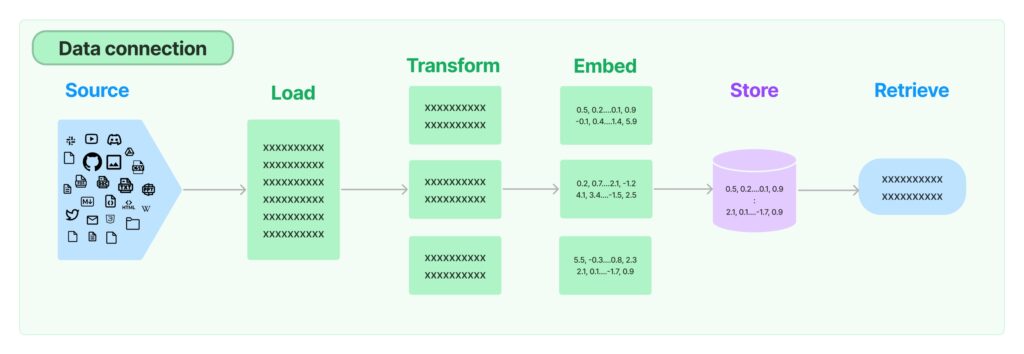
Vector search and embeddings
Vector search retrieves embeddings based on similarity to a query vector and is widely used in search, recommendations, and anomaly detection. Understanding embeddings is foundational: once mastered, they enable the construction of systems ranging from search engines to advanced chatbots.
Next, we dive into embeddings—the core building block behind retrieval-augmented language models.
Embeddings
An embedding is a numerical representation of content that machines can process. It converts objects such as text or images into vectors that capture semantic meaning while discarding irrelevant details. In an embedding space, the distance between vectors reflects semantic similarity between the original pieces of content.
For text, embeddings map words, sentences, or documents into high-dimensional vectors. For example, OpenAI’s text embedding models represent text as vectors of 1,536 floating-point numbers, derived from language models trained to encode semantic relationships.
As a simple illustration, the words cat and dog can be represented as vectors in the same space as other concepts. We would expect cat and dog to be closer to animal than to computer, reflecting their semantic similarity.
How embeddings are created
Early text representations used methods like bag-of-words, where words are counted without considering meaning or order. This approach is implemented in libraries such as scikit-learn’s CountVectorizer. Later, word2vec introduced dense embeddings by predicting words from their surrounding context, learning semantic relationships in the process.
The general idea of embeddings is shown in the following figure:

Simple vector arithmetic can reveal semantic relationships, for example:
king − man + woman ≈ queen.
For images, embeddings can be generated from features such as edges, textures, and colors. Traditionally, these features were extracted manually, but today Convolutional Neural Networks (CNNs) pretrained on large datasets (for example, ImageNet) are commonly used. CNNs produce embedding vectors that summarize visual content in a way that is scale- and shift-invariant.
Across both text and images, modern embeddings are most often produced by transformer-based models, which capture context, word order, and complex relationships by training on large datasets.
What embeddings are used for
Once data is represented as vectors, we can:
- Measure similarity and distance
- Perform semantic search
- Cluster or classify content
- Feed embeddings into downstream machine learning models
For example, sentiment classification can be implemented by checking whether review embeddings are closer to positive or negative concepts.
Distance metrics between embeddings
Common similarity and distance measures include:
- Cosine distance: Measures the angle between vectors (range −1 to 1).
- Euclidean distance: Straight-line distance between vectors (range 0 to ∞).
- Dot product: Measures magnitude and directional similarity (range −∞ to ∞).
Creating embeddings in LangChain
In LangChain, embeddings can be generated using the OpenAIEmbeddings class.
from langchain.embeddings.openai import OpenAIEmbeddings

embeddings = OpenAIEmbeddings()
text = "This is a sample query."
query_result = embeddings.embed_query(text)

print(query_result)
print(len(query_result))
This example generates an embedding for a single query string. The length of the vector corresponds to the embedding dimensionality. It assumes the OpenAI API key is set as an environment variable, as described in Chapter 3.
To embed multiple inputs, use embed_documents():
from langchain.embeddings.openai import OpenAIEmbeddings

words = ["cat", "dog", "computer", "animal"]
embeddings = OpenAIEmbeddings()
doc_vectors = embeddings.embed_documents(words)
Here, embeddings are generated for multiple short text inputs, though the same method works for longer documents.
Computing distances between embeddings
We can calculate distances between embeddings using standard scientific libraries:
from scipy.spatial.distance import pdist, squareform
import pandas as pd
import numpy as np

X = np.array(doc_vectors)
dists = squareform(pdist(X))
This produces a matrix of Euclidean distances. To visualize the results:
df = pd.DataFrame(
    data=dists,
    index=words,
    columns=words
)
df.style.background_gradient(cmap='coolwarm')
The resulting visualization looks like this:

As expected, cat and dog are closer to animal than to computer. While the exact distances can raise interesting questions, this example mainly illustrates how embeddings encode semantic relationships.
Beyond OpenAI embeddings
While these examples use OpenAI embeddings, later sections use models served by Hugging Face. LangChain supports multiple embedding providers and also includes a FakeEmbeddings class for testing pipelines without external API calls.
In this chapter, embeddings are primarily used for semantic retrieval. To integrate them into applications and larger systems, we need vector storage, which is the next topic we’ll explore.
How can we store embeddings?
In vector search, each data object is represented as a vector embedding in a high-dimensional space. These vectors encode the features or semantic characteristics of the data. Given a query vector, the goal is to find the stored vectors that are most similar to it.
Similarity is measured using distance metrics such as cosine similarity, Euclidean distance, or dot product. During a search, the query vector is compared against vectors in the collection, and those with the smallest distance (or highest similarity) are returned.
Because comparing a query against large numbers of vectors can be computationally expensive, efficient vector storage and retrieval mechanisms are required.
Vector search and vector storage
Vector search is the process of retrieving vectors that are most similar to a given query vector. It underpins many applications, including semantic search, recommendation systems, and image or text retrieval.
Vector storage refers to the systems used to store embeddings and support efficient similarity search. These systems range from low-level indexing structures to full-featured vector databases designed specifically for large-scale embedding workloads.
There are three main layers involved:
- Indexing
Indexing structures organize vectors to speed up retrieval. Algorithms such as k-d trees, Annoy, or approximate nearest neighbor (ANN) methods reduce the number of comparisons required during search. - Vector libraries
Vector libraries provide efficient implementations of vector operations, such as similarity calculations and index management. Examples include FAISS, which focuses on fast similarity search over dense vectors. - Vector databases
Vector databases, such as Milvus or Pinecone, are purpose-built systems for storing, managing, and querying large collections of embeddings. They combine indexing, persistence, scalability, and metadata filtering, offering advantages over standalone vector indexes.
These layers work together to support the creation, storage, and efficient retrieval of embeddings at scale.
In LangChain, there is an additional abstraction on top of these layers: retrievers, which unify embedding generation, storage, and querying. We’ll cover retrievers after exploring these storage mechanisms in more detail.
Vector indexing
Vector indexing organizes embeddings to optimize storage and retrieval, similar to indexing in traditional databases. The goal is to structure vectors so that similar vectors are located close to each other, enabling fast similarity or proximity searches.
While early methods such as k-d trees were commonly used, high-dimensional embeddings require more advanced techniques. As a result, modern systems often rely on algorithms like Ball Trees, Annoy, FAISS, or graph-based methods, which scale better with dimensionality.
K-Nearest Neighbors (KNN)
K-Nearest Neighbors (KNN) is a simple and intuitive algorithm for classification and regression based on similarity.
How KNN works:
- Choose k: Select the number of neighbors to consider.
- Compute distances: Measure distances (commonly Euclidean) between the query point and all data points.
- Select neighbors: Identify the k closest vectors.
- Aggregate results:
- Classification: Choose the majority class
- Regression: Compute the average value
- Return prediction
KNN is a lazy learning algorithm: it does not build a model in advance but performs all computations at query time, which can be costly for large datasets.
Alternatives to KNN for vector indexing
To improve scalability and performance, several alternative indexing approaches are widely used:
- Product Quantization (PQ)
PQ partitions the vector space into smaller subspaces and quantizes them independently. This reduces memory usage and speeds up search, often at the cost of some accuracy. - Locality Sensitive Hashing (LSH)
LSH maps similar vectors into the same hash buckets using randomized hashing. It is efficient for high-dimensional data but may introduce false positives or negatives. - Hierarchical Navigable Small World (HNSW)
HNSW builds a multi-layer graph structure that enables fast and accurate nearest-neighbor search. It is widely used due to its strong balance of speed, accuracy, and scalability.
Tree- and graph-based methods
- k-d Trees: Binary trees that partition data along feature dimensions. Effective for low-dimensional spaces but degrade as dimensionality increases.
- Ball Trees: Partition data into nested hyperspheres, making them more suitable for higher-dimensional data than k-d trees.
- Graph-based approaches: Beyond HNSW, methods such as Graph Neural Networks (GNNs) and Graph Convolutional Networks (GCNs) leverage graph structures for similarity modeling and retrieval.
Annoy
Annoy (Approximate Nearest Neighbors Oh Yeah) uses random projection trees built from random hyperplanes. It is easy to use, memory efficient, and well-suited for fast approximate nearest-neighbor search.
Vector libraries
Vector libraries such as FAISS (Meta) and Annoy (Spotify) provide tools for storing, indexing, and searching vector embeddings. In vector search, these libraries are optimized for similarity search using Approximate Nearest Neighbor (ANN) algorithms, which trade exactness for speed and scalability.
ANN-based libraries typically offer multiple indexing strategies—such as clustering, tree-based, or graph-based methods—allowing efficient similarity search over large, high-dimensional datasets. They are widely used in applications like semantic search, recommendations, and retrieval-augmented generation.
An overview of popular open-source vector libraries and their GitHub popularity is shown below:
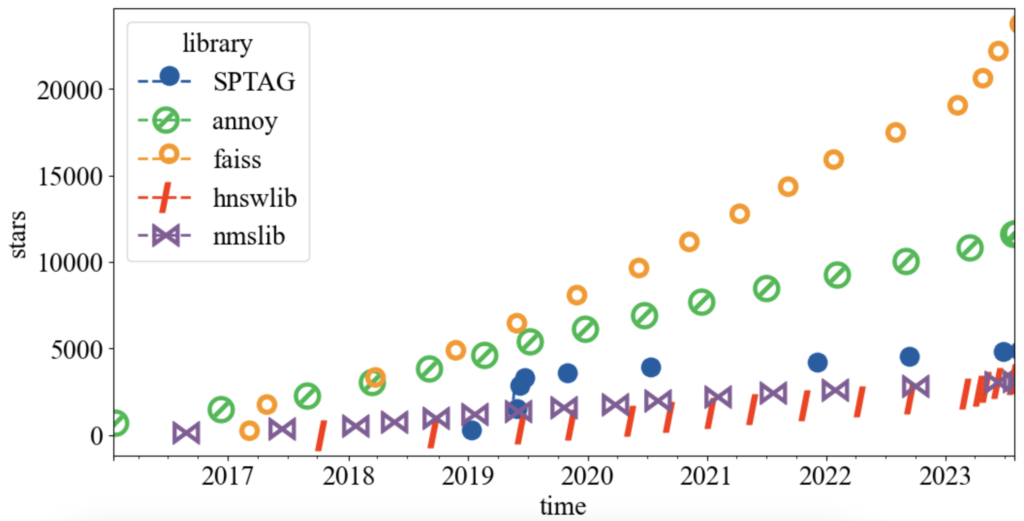
FAISS leads in popularity, followed by Annoy, while other libraries have smaller but active user bases.
Popular vector libraries
- FAISS (Facebook AI Similarity Search)
Developed by Meta, FAISS provides efficient similarity search and clustering for dense vectors. It supports multiple indexing algorithms, including Product Quantization (PQ), LSH, and HNSW, and offers both CPU and GPU acceleration. FAISS is widely used for large-scale vector search. - Annoy
Maintained by Spotify, Annoy is a C++ library for approximate nearest-neighbor search using random projection trees. It is simple, memory efficient, and well-suited for large, mostly read-only vector datasets. - hnswlib
A lightweight C++ library implementing the HNSW algorithm. It provides fast and memory-efficient similarity search for high-dimensional vectors. - nmslib (Non-Metric Space Library)
An open-source library for similarity search in non-metric spaces. It supports algorithms such as HNSW, SW-graph, and SPTAG. - SPTAG (Microsoft)
A distributed ANN library supporting k-d trees and balanced k-means trees, combined with relative neighborhood graphs.
Both nmslib and hnswlib are maintained by Leo Boytsov and Yury Malkov, who have contributed significantly to modern similarity search research.
Many additional libraries and benchmarks are available; a comprehensive comparison can be found here.
Vector databases
A vector database is a specialized database designed to store, manage, and query vector embeddings efficiently. Unlike basic vector storage, vector databases provide a full-featured solution including metadata management, filtering, scalability, and persistence. They are particularly useful for applications operating on large volumes of vectorized data such as text, images, audio, and video.
The primary use case for vector databases is similarity (semantic) search, where objects are retrieved based on closeness in vector space rather than exact matches. This enables applications such as document search, recommendation systems, and reverse image search.
Common use cases
Beyond semantic search, vector databases are widely used for:
- Anomaly Detection: Identifying unusual patterns in embeddings, useful in fraud detection and monitoring.
- Personalization: Powering recommendation systems based on user preferences or behavior.
- Natural Language Processing (NLP): Supporting sentiment analysis, classification, and semantic retrieval by comparing text embeddings.
Vector databases are optimized for high-dimensional spaces, which traditional relational databases struggle to handle efficiently.
Key characteristics
Vector databases typically provide:
- Efficient similarity search over high-dimensional embeddings
- Task specialization, focusing on nearest-neighbor retrieval rather than general-purpose queries
- Scalability to thousands of dimensions and millions of vectors
- Advanced search capabilities, enabling semantic and recommendation-based applications
Overall, vector databases enable efficient and scalable handling of embedding-based workloads.
Market landscape
The rise of AI and data-driven applications has driven demand for new database categories. Historically, market-creating databases such as MongoDB, Neo4J, and InfluxDB have achieved strong adoption and VC backing. Vector databases are emerging as the next major category, attracting significant investment.
PostgreSQL also supports vector search via extensions such as pg_embedding, which uses HNSW indexing and offers improved performance compared to pgvector with IVFFlat.
Popular vector databases
| Database | Description | Business model | First released | License | Indexing | Organization |
|---|---|---|---|---|---|---|
| Chroma | Commercial open-source embedding store | (Partly open) SaaS | 2022 | Apache 2.0 | HNSW | Chroma Inc |
| Qdrant | Vector DB with extended filtering | (Partly open) SaaS | 2021 | Apache 2.0 | HNSW | Qdrant GmbH |
| Milvus | Scalable similarity search DB | (Partly open) SaaS | 2019 | BSD | IVF, HNSW, PQ | Zilliz |
| Weaviate | Cloud-native object + vector DB | Open SaaS | 2019 | BSD | Custom HNSW (CRUD) | SeMI Technologies |
| Pinecone | Managed vector DB for embeddings | SaaS | 2019 | Proprietary | FAISS-based | Pinecone Systems |
| Vespa | Vector + lexical search engine | Open SaaS | 2017 | Apache 2.0 | HNSW, BM25 | Yahoo! |
| Marqo | Search and analytics engine | Open SaaS | 2022 | Apache 2.0 | HNSW | S2Search |
The comparison highlights:
- Value proposition
- Business model
- Indexing approach
- License
Other aspects (such as sharding or in-memory execution) are omitted. Many solutions exist; this chapter focuses on those integrated with LangChain.
Popularity trends
GitHub star history provides insight into adoption:
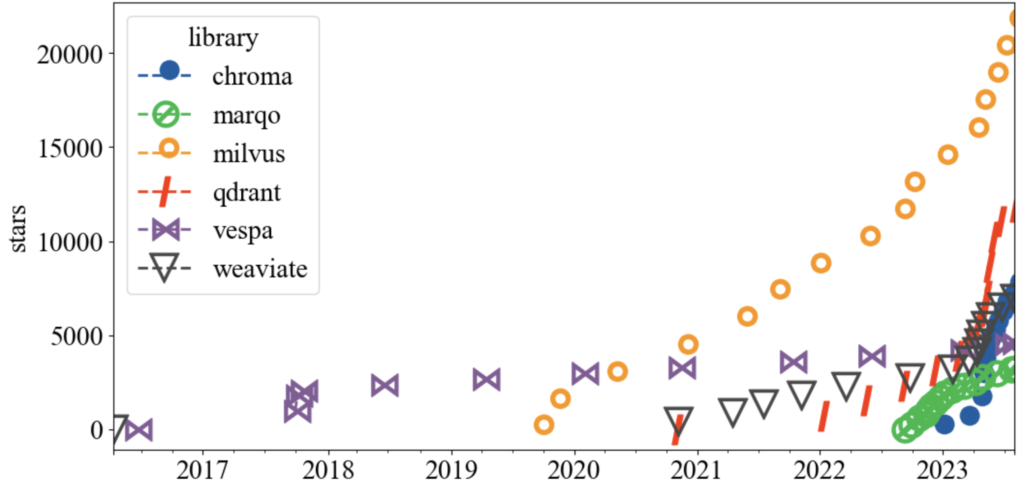
Milvus leads in popularity, while Qdrant, Weaviate, and Chroma show strong growth.
Vector databases in LangChain
LangChain provides vector database integrations through the vectorstores module.
Chroma
Chroma is a vector store optimized for similarity search using angular similarity.
from langchain.vectorstores import Chroma
from langchain.embeddings import OpenAIEmbeddings
Create a vector store from documents:
vectorstore = Chroma.from_documents(
    documents=docs,
    embedding=OpenAIEmbeddings()
)
Add vectors directly:
vector_store = Chroma()
vector_store.add_vectors(vectors)
Query for similar vectors:
similar_vectors = vector_store.query(query_vector, k)
Pinecone
To integrate Pinecone with LangChain:
- Install the client:
pip install pinecone
- Import and initialize:
import pinecone
pinecone.init()
- Create an index:
docsearch = Pinecone.from_texts(["dog", "cat"], embeddings)
- Perform similarity search:
docs = docsearch.similarity_search(
    "terrier",
    include_metadata=True
)
Retrieved documents can then be used in question-answering chains, as shown in Chapter 4.
Document loaders
Document loaders load data from various sources and convert it into Document objects, which contain text (page_content) and metadata. LangChain provides many built-in loaders for different data sources, including:
- TextLoader: Load plain text files
- WebBaseLoader: Load webpage content
- ArxivLoader: Retrieve academic articles from arXiv
- YoutubeLoader: Load YouTube video transcripts
- WikipediaLoader: Load Wikipedia articles
- ImageCaptionLoader: Generate captions for images
- Diffbot integration: Clean extraction of webpage content
Each loader implements a load() method that returns documents. Some loaders also support lazy_load() to stream data only when needed.
Example: loading a text file
from langchain.document_loaders import TextLoader

loader = TextLoader(file_path="path/to/file.txt")
documents = loader.load()
Each document contains text content and associated metadata (for example, source or title).
Example: loading from Wikipedia
from langchain.document_loaders import WikipediaLoader

loader = WikipediaLoader("LangChain")
documents = loader.load()
Document loader implementations may vary across frameworks, but the abstraction remains the same.
In LangChain, documents are typically retrieved through retrievers, which sit on top of vector storage. Let’s look at how retrievers work.
Retrievers in LangChain
Retrievers are components responsible for searching and returning relevant documents from an index. The most common retriever type in LangChain is the vectorstore retriever, which uses a vector database (such as Chroma) as its backend.
Retrievers are central to tasks like question answering over documents, where they identify the most relevant context for a given query.
Common retriever types
- BM25 Retriever
Ranks documents using the BM25 algorithm based on term frequency and document length. - TF-IDF Retriever
Uses term frequency–inverse document frequency weighting to rank documents. - Dense Retriever
Uses dense embeddings and similarity metrics (such as cosine similarity). - kNN Retriever
Applies the k-nearest neighbors algorithm to retrieve documents based on embedding similarity.
Each retriever has different trade-offs, and the choice depends on the use case and data characteristics.
Example: kNN retriever with OpenAI embeddings
from langchain.retrievers import KNNRetriever
from langchain.embeddings import OpenAIEmbeddings

words = ["cat", "dog", "computer", "animal"]
retriever = KNNRetriever.from_texts(words, OpenAIEmbeddings())
Retrieve relevant documents:
result = retriever.get_relevant_documents("dog")
print(result)
Example output:
[
 Document(page_content='dog', metadata={}),
 Document(page_content='animal', metadata={}),
 Document(page_content='cat', metadata={}),
 Document(page_content='computer', metadata={})
]
Each returned object is a Document with content and metadata.
Specialized retrievers
LangChain also includes retrievers for external knowledge sources:
- Arxiv Retriever: Retrieves scientific articles from arXiv
- Wikipedia Retriever: Fetches Wikipedia pages
- PubMed Retriever: Accesses biomedical literature from PubMed
Example: using the PubMed retriever
from langchain.retrievers import PubMedRetriever

retriever = PubMedRetriever()
documents = retriever.get_relevant_documents("COVID")

for document in documents:
    print(document.metadata["title"])
Example output:
- The COVID-19 pandemic highlights the need for psychological support in systemic sclerosis patients.
- Host genetic polymorphisms involved in long-term symptoms of COVID-19.
- Association Between COVID-19 Vaccination and Mortality after Major Operations.
Custom retrievers
You can implement a custom retriever by subclassing BaseRetriever and defining the get_relevant_documents() method:
from langchain.retriever import BaseRetriever
from langchain.schema import Document
from typing import List

class MyRetriever(BaseRetriever):
    def get_relevant_documents(self, query: str) -> List[Document]:
        # Implement custom retrieval logic here
        relevant_documents = []
        return relevant_documents
This allows integration with any data source or retrieval strategy.
Implementing a Chatbot with LangChain
We’ll implement a retrieval-based chatbot that can load documents in multiple formats and answer user queries. The workflow is:
- Load documents
- Create a vector store
- Configure a chatbot with retrieval
- Provide a web interface using Streamlit
1. Document Loading
LangChain supports loading PDF, TXT, EPUB, and Word documents. We define a flexible loader interface:
from typing import Any
from langchain.document_loaders import (
    PyPDFLoader, TextLoader,
    UnstructuredWordDocumentLoader,
    UnstructuredEPubLoader
)

class EpubReader(UnstructuredEPubLoader):
    def __init__(self, file_path: str | list[str], **kwargs: Any):
        super().__init__(file_path, **kwargs, mode="elements", strategy="fast")

class DocumentLoaderException(Exception):
    pass

class DocumentLoader:
    """Load a document with a supported extension."""
    supported_extensions = {
        ".pdf": PyPDFLoader,
        ".txt": TextLoader,
        ".epub": EpubReader,
        ".docx": UnstructuredWordDocumentLoader,
        ".doc": UnstructuredWordDocumentLoader
    }
Loader logic:
import logging
import pathlib
from langchain.schema import Document

def load_document(temp_filepath: str) -> list[Document]:
    """Load a file and return it as a list of documents."""
    ext = pathlib.Path(temp_filepath).suffix
    loader_cls = DocumentLoader.supported_extensions.get(ext)
    if not loader_cls:
        raise DocumentLoaderException(f"Unsupported file type {ext}")
    loader = loader_cls(temp_filepath)
    docs = loader.load()
    logging.info(docs)
    return docs
2. Creating a Vector Store
We use HuggingFace embeddings and DocArray in-memory vector storage. Documents are split into chunks and indexed for retrieval.
from langchain.embeddings import HuggingFaceEmbeddings
from langchain.text_splitter import RecursiveCharacterTextSplitter
from langchain.vectorstores import DocArrayInMemorySearch
from langchain.schema import Document, BaseRetriever

def configure_retriever(docs: list[Document], use_compression=False) -> BaseRetriever:
    # Split documents
    text_splitter = RecursiveCharacterTextSplitter(chunk_size=1500, chunk_overlap=200)
    splits = text_splitter.split_documents(docs)

    # Create embeddings and store in vector DB
    embeddings = HuggingFaceEmbeddings(model_name="all-MiniLM-L6-v2")
    vectordb = DocArrayInMemorySearch.from_documents(splits, embeddings)

    # Define retriever (MMR for diverse results)
    retriever = vectordb.as_retriever(search_type="mmr", search_kwargs={"k": 2, "fetch_k": 4})

    # Optional contextual compression
    if use_compression:
        from langchain.retrievers.document_compressors import EmbeddingsFilter
        from langchain.retrievers import ContextualCompressionRetriever
        embeddings_filter = EmbeddingsFilter(embeddings=embeddings, similarity_threshold=0.76)
        retriever = ContextualCompressionRetriever(base_compressor=embeddings_filter, base_retriever=retriever)

    return retriever
Notes:
MMR(Maximum Marginal Relevance) ensures retrieved documents are diverse.ContextualCompressionRetrieverfilters documents to keep only query-relevant content, reducing processing cost.
3. Configure the Chat Chain
We use ConversationalRetrievalChain with memory to maintain context and ChatOpenAI as the LLM.
from langchain.chains import ConversationalRetrievalChain
from langchain.chat_models import ChatOpenAI
from langchain.memory import ConversationBufferMemory
from langchain.chains.base import Chain

def configure_chain(retriever: BaseRetriever) -> Chain:
    """Set up chat chain with retrieval and memory."""
    memory = ConversationBufferMemory(memory_key="chat_history", return_messages=True)
    llm = ChatOpenAI(model_name="gpt-3.5-turbo", temperature=0, streaming=True)

    return ConversationalRetrievalChain.from_llm(
        llm,
        retriever=retriever,
        memory=memory,
        verbose=True,
        max_tokens_limit=4000
    )
4. Integrating File Uploads
import os
import tempfile

def configure_qa_chain(uploaded_files):
    """Load documents, configure retriever, and return chat chain."""
    docs = []
    temp_dir = tempfile.TemporaryDirectory()
    for file in uploaded_files:
        temp_filepath = os.path.join(temp_dir.name, file.name)
        with open(temp_filepath, "wb") as f:
            f.write(file.getvalue())
        docs.extend(load_document(temp_filepath))

    retriever = configure_retriever(docs=docs)
    return configure_chain(retriever=retriever)
5. Streamlit Interface
import streamlit as st
from langchain.callbacks import StreamlitCallbackHandler

st.set_page_config(page_title="LangChain: Chat with Documents", page_icon="🦜")
st.title("🦜 LangChain: Chat with Documents")

uploaded_files = st.sidebar.file_uploader(
    label="Upload files",
    type=list(DocumentLoader.supported_extensions.keys()),
    accept_multiple_files=True
)

if not uploaded_files:
    st.info("Please upload documents to continue.")
    st.stop()

qa_chain = configure_qa_chain(uploaded_files)

# Chat interface
assistant = st.chat_message("assistant")
user_query = st.chat_input(placeholder="Ask me anything!")

if user_query:
    stream_handler = StreamlitCallbackHandler(assistant)
    response = qa_chain.run(user_query, callbacks=[stream_handler])
    st.markdown(response)
Memory Mechanisms in LangChain
Memory allows chatbots and LLMs to remember previous interactions, maintain context, and extract knowledge from conversations. It is essential for creating more human-like and context-aware experiences.
1. Why Memory is Important
- Remember previous interactions: Keep track of what the user has said before.
- Maintain context: Ensure coherent multi-turn conversations.
- Extract knowledge: Summarize or store information that can be referenced later.
2. Basic Memory Types
a) ConversationBufferMemory
Stores the entire conversation history in memory.
from langchain.memory import ConversationBufferMemory
from langchain.chains import ConversationChain

memory = ConversationBufferMemory()
chain = ConversationChain(memory=memory)

response = chain.predict(input="Hi, how are you?")
response = chain.predict(input="What's the weather today?")
print(memory.chat_memory.messages)
- Stores all past messages.
- Use
return_messages=Trueto get messages as a list. - Use
save_context()to manually store inputs/outputs.
b) ConversationBufferWindowMemory
Stores only the last K interactions. Good for limited context scenarios.
from langchain.memory import ConversationBufferWindowMemory

memory = ConversationBufferWindowMemory(k=1)
memory.save_context({"input": "hi"}, {"output": "whats up"})
memory.save_context({"input": "not much"}, {"output": "same"})
print(memory.load_memory_variables({}))
c) ConversationSummaryMemory
Stores a summary of the conversation rather than full messages.
Useful for long conversations or token-limited models.
from langchain.memory import ConversationSummaryMemory
from langchain.llms import OpenAI

memory = ConversationSummaryMemory(llm=OpenAI(temperature=0))
memory.save_context({"input": "hi"}, {"output": "hello"})
print(memory.load_memory_variables({}))
d) CombinedMemory
Combine multiple memory strategies. Example: full conversation + summary.
from langchain.memory import CombinedMemory, ConversationBufferMemory, ConversationSummaryMemory

conv_memory = ConversationBufferMemory(memory_key="chat_history")
summary_memory = ConversationSummaryMemory(llm=OpenAI(temperature=0))
memory = CombinedMemory(memories=[conv_memory, summary_memory])
e) ConversationSummaryBufferMemory
- Keeps recent interactions in a buffer.
- Summarizes older messages when exceeding a token limit.
- Useful for maintaining sliding window summaries without losing context.
3. Knowledge Graph Memory
ConversationKGMemory stores structured knowledge from the conversation as a knowledge graph.
from langchain.memory import ConversationKGMemory
from langchain.llms import OpenAI

llm = OpenAI(temperature=0)
memory = ConversationKGMemory(llm=llm)
- Captures entities, attributes, and relationships from conversation.
- Useful for semantic reasoning and structured knowledge retrieval.
4. Customizing Memory
- Prefixes: Customize how the AI and Human messages are labeled.
- Prompt templates: Control the structure and style of conversation.
from langchain.prompts import PromptTemplate
from langchain.chains import ConversationChain

template = """The following is a friendly conversation between a human and an AI.
The AI is talkative and provides lots of specific details.
If the AI does not know an answer, it says so.
Current conversation:
{history}
Human: {input}
AI Assistant:"""

PROMPT = PromptTemplate(input_variables=["history", "input"], template=template)
conversation = ConversationChain(
    llm=OpenAI(temperature=0),
    prompt=PROMPT,
    verbose=True,
    memory=ConversationBufferMemory(ai_prefix="AI Assistant"),
)
5. Zep: Long-Term Memory
Zep is a memory store + search engine for chatbots. Features:
- Persist chat history
- Embed, index, summarize, and enrich conversations
- Low-latency access
from langchain.memory import ZepMemory
from uuid import uuid4

ZEP_API_URL = "http://localhost:8000"
ZEP_API_KEY = "<your JWT token>"
session_id = str(uuid4())

memory = ZepMemory(
    session_id=session_id,
    url=ZEP_API_URL,
    api_key=ZEP_API_KEY,
    memory_key="chat_history"
)
6. Summary Table of Memory Types
| Memory Type | Stores | Notes |
|---|---|---|
ConversationBufferMemory | All messages | Full chat history |
ConversationBufferWindowMemory | Last K messages | Sliding window |
ConversationSummaryMemory | Summarized history | Reduces token usage |
ConversationSummaryBufferMemory | Recent + summary | Summarized old messages, keeps recent buffer |
ConversationKGMemory | Knowledge graph | Entities, relations for semantic reasoning |
CombinedMemory | Multiple types | Merge strategies for richer context |
ZepMemory | Persistent storage | Long-term memory, searchable, embeddable |
Memory in LangChain allows flexible, context-aware conversation management, from simple short-term buffers to long-term, enriched knowledge storage.
Conclusion
In this chapter, we explored building chatbots using Retrieval-Augmented Language Models (RALMs), focusing on how external knowledge sources can enhance content generation. We began by discussing the evolution of chatbots, highlighting the shift from rule-based systems to context-aware, memory-enabled assistants that leverage LLMs for more natural and informed interactions. Central to this approach is the use of vector embeddings, which represent documents or data as high-dimensional numerical vectors, allowing similarity-based retrieval using distance metrics like cosine similarity or Euclidean distance.
To efficiently manage and search these embeddings, we examined vector indexing algorithms such as k-d trees, Ball Trees, Annoy, FAISS, and HNSW, and the libraries and databases that implement them, including FAISS, Annoy, Milvus, Chroma, and Pinecone. Document loaders were introduced as a way to import content from multiple formats—PDFs, text files, Word, EPUB, Wikipedia articles, or YouTube transcripts—and convert them into standardized Document objects with metadata, which can then be embedded and stored in vector databases.
Retrievers were covered next, demonstrating how they query vector stores to fetch relevant documents based on user input, with advanced techniques like Maximum Marginal Relevance (MMR) helping to ensure diversity and relevance in retrieval results. We then implemented a retrieval-based chatbot, illustrating the full pipeline from document loading, text splitting, embedding, vector storage, and retrieval to integration with a conversational chain.
Memory mechanisms were discussed extensively, showing how LangChain supports various strategies—from ConversationBufferMemory and ConversationBufferWindowMemory to ConversationSummaryMemory, CombinedMemory, ConversationKGMemory, and ZepMemory—to maintain context, summarize interactions, and store knowledge over time. Finally, we highlighted the importance of moderation and guardrails, which ensure chatbots generate safe, ethical, and on-topic responses while adhering to organizational values. Overall, this chapter demonstrated how the combination of retrieval, embeddings, memory, and moderation creates robust, context-aware chatbots capable of informed, safe, and conversationally coherent interactions.