
We’ve covered core aspects of LLM application features, such as:
- Prompting Techniques in Chapter 1
- RAG (Retrieval-Augmented Generation) in Chapters 2 and 3
- Memory in Chapter 4
Now, the pressing question is: How do we integrate these components into a cohesive application that meets our goals?
Imagine constructing a building—a swimming pool and a one-story house use similar materials but serve distinct purposes due to the way they’re designed. Similarly, in building LLM applications, one must decide how to combine components like RAG, prompting techniques, and memory to achieve the desired outcome.
Example: Building an Email Assistant
Before diving into specific architectures, consider a practical example: an email assistant. This app’s purpose is to manage your inbox effectively, archiving irrelevant emails, directly replying to some, and flagging important ones for later review.
Constraints and Considerations:
Define constraints to shape your application:
- Minimize Interruptions: The app should minimally disturb you.
- Ensure Appropriate Replies: Your correspondents shouldn’t get unexpected responses.
This highlights a common trade-off in LLM application development: Agency vs. Reliability—balancing autonomy with trustworthiness.
Degrees of Autonomy
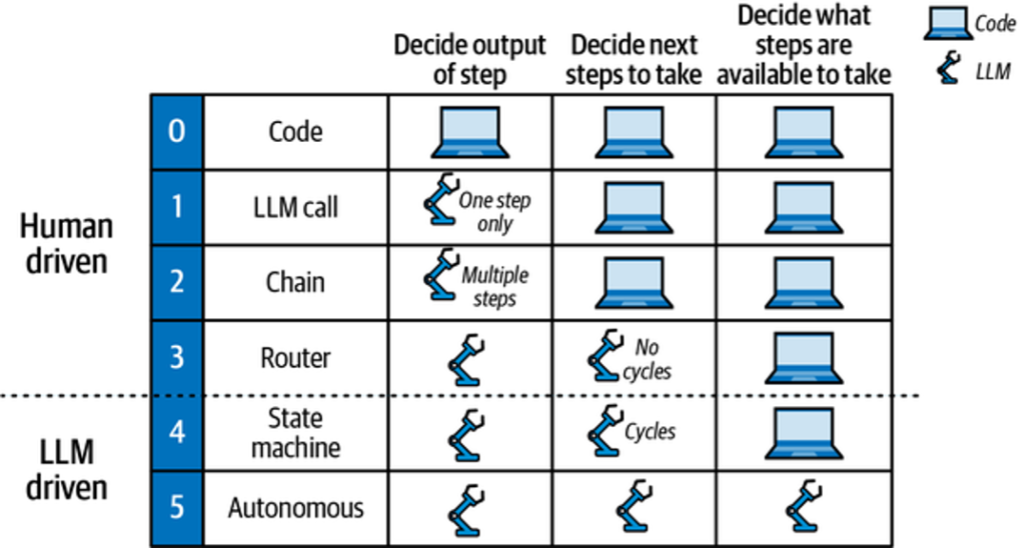
Evaluate an LLM application’s autonomy by considering:
- If the LLM decides on outputs (e.g., drafting email replies).
- If the LLM chooses the next action (e.g., archiving or replying).
- If the LLM determines available actions (e.g., creating dynamic actions).
These decisions influence the architecture known as « cognitive architectures, » where the LLM or developer controls steps like RAG or chain-of-thought prompts.
Cognitive Architecture Recipes
Let’s explore different architectural models for LLM applications:
- 0: Code
- This isn’t an LLM architecture but traditional software development.
- 1: LLM Call
- Involves a single LLM call, often part of larger applications for tasks like translation or summarization.
- 2: Chain
- Utilizes multiple LLM calls in sequence. For example, converting text to SQL by:
- Generating a SQL query from natural language input.
- Creating a nontechnical explanation of the query.
- Utilizes multiple LLM calls in sequence. For example, converting text to SQL by:
- 3: Router
- Uses an LLM to decide the sequence of steps. For example, in a RAG application:
- Selecting the correct document index using an LLM.
- Fetching relevant documents from this index.
- Generating answers using user queries and fetched documents.
- Uses an LLM to decide the sequence of steps. For example, in a RAG application:
In upcoming chapters, we’ll delve further into these architectures, particularly those making extensive use of LLMs, known as agentic architectures. Before that, we’ll explore better tooling options to enhance your LLM development experience.
Table of Contents
Architecture #1: LLM Call
In this example, we revisit the chatbot from Chapter 4 to demonstrate the Language Model (LLM) call architecture. This chatbot handles user messages directly. Let’s dive into how you can set up a StateGraph and add a node for LLM calls using Python.
Setting Up the StateGraph
Begin by creating a StateGraph, and add a node to represent the LLM call:
from typing import Annotated, TypedDict
from langgraph.graph import StateGraph, START, END
from langgraph.graph.message import add
from langchain import ChatOpenAI

model = ChatOpenAI()

class State(TypedDict):
    # Messages have the type "list". The `add` function in the annotation
    # defines how this state should be updated, appending new messages to
    # the list rather than replacing previous ones.
    messages: Annotated[list, add]

def chatbot(state: State):
    answer = model.invoke(state["messages"])
    return {"messages": [answer]}

builder = StateGraph(State)
builder.add("chatbot", chatbot)
builder.add(START, 'chatbot')
builder.add('chatbot', END)

graph = builder.compile()Visualizing the StateGraph
To visualize the graph, you can generate a diagram to understand the flow:
graph.get().draw()Running the Chatbot
You can execute this setup using the stream() method to interact with the chatbot:
input = {"messages": [HumanMessage('hi!')]}
for chunk in graph.stream(input):
print(chunk)Expected Output
Here’s what you would expect as the output:
{ "chatbot": { "messages": [AIMessage("How can I help you?")] } }The input to the graph matches the State object’s shape defined earlier: a list of messages stored under the messages key.
Use Cases for This Simple Architecture
This straightforward architecture is highly effective in scenarios like:
- AI-powered Features: Features such as summarize and translate in applications like Notion.
- SQL Query Generation: Even simple SQL queries can be generated via a single LLM call, depending on the user experience goals.
This structure, while simple, remains powerful and widely applicable across different AI-powered functionalities in modern software.
Architecture #2: Chain
In this section, we’ll explore an advanced architecture for leveraging multiple Large Language Model (LLM) calls in a predefined sequence to create more sophisticated applications. A prime example is a text-to-SQL application, which takes a user’s natural language input and converts it into a SQL query. This process can start with a single LLM call but can be enhanced through sequential LLM calls, a technique some refer to as flow engineering.
Architecture Flow Description
Here’s how the process works, step-by-step:
- Generate SQL Query:
The first LLM call transforms a natural language query into a SQL query using information about the database. - Explain the Query:
A second LLM call explains the generated SQL query in non-technical terms, helping users verify its accuracy.
Beyond these steps, you could add:
- Execute the Query: Run the generated SQL against the database to retrieve results.
- Summarize Results: Use a third LLM call to convey the query results in plain language.
Implementing with LangGraph
Let’s dive into a Python implementation using LangGraph. This framework aids in organizing multiple LLM calls efficiently.
from typing import Annotated, TypedDict
from langchain.messages import HumanMessage, SystemMessage
from langchain import ChatOpenAI
from langgraph.graph import END, START, StateGraph
from langgraph.graph.message import add

# Create models with different temperatures for varying output creativity
model_low_temp = ChatOpenAI(temperature=0.1)
model_high_temp = ChatOpenAI(temperature=0.7)

# Define state and input/output types for tracking
class State(TypedDict):
    messages: Annotated[list, add]
    user: str
    sql: str

class Input(TypedDict):
    user: str

class Output(TypedDict):
    sql: str

# First, generate the SQL query
generate_prompt = SystemMessage("You are a helpful data analyst who generates SQL queries for users based on their questions.")

def generate(state: State) -> State:
    user = HumanMessage(state["user"])
    messages = [generate_prompt, *state["messages"], user]
    res = model_low_temp.invoke(messages)
    return {
        "sql": res.content,
        "messages": [user, res],
    }

# Then, explain the SQL query to the user
explain_prompt = SystemMessage("You are a helpful data analyst who explains SQL queries to users.")

def explain(state: State) -> State:
    messages = [explain_prompt, *state["messages"]]
    res = model_high_temp.invoke(messages)
    return {
        "sql": res.content,
        "messages": res,
    }

# Assemble the graph
builder = StateGraph(State, input=Input, output=Output)
builder.add("generate", generate)
builder.add("explain", explain)
builder.add(START, "generate")
builder.add("generate", "explain")
builder.add("explain", END)

graph = builder.compile()Example Usage
Invoke the graph with an input query:
result = graph.invoke({"user": "What is the total sales for each product?"})The output will be:
{
  "sql": "SELECT product, SUM(sales) AS total_sales BY product;",
  "sql": "This query will retrieve the total sales for each product by summing up the sales column for each product and grouping the results by product."
}The graph first executes the generate node to create a SQL query, updating the sql and messages keys. Next, the explain node provides a clear user explanation of the query. This setup allows customization of input and output schemas, ensuring clarity and accuracy throughout.
By using this structured flow, you gain the ability to create complex, reliable applications that interact seamlessly with both databases and end-users, dramatically enhancing the user experience.
Architecture #3: Router
The router architecture elevates the capabilities of LLMs (Large Language Models) by empowering them to determine the next steps, unlike the traditional chain architecture that follows a fixed sequence. In this framework, LLMs dynamically select from predefined steps. Let’s explore how this can be applied with a Retrieval-Augmented Generation (RAG) application, which involves querying multiple document indexes from different domains.
Example: Multi-Index RAG Application
For optimal performance, it’s essential to eliminate irrelevant data in the input prompts to the LLMs. This requires selectively choosing the appropriate document index per query. Here’s how an LLM can help:
- Query Evaluation: The LLM evaluates the incoming query to decide which index to use, optimizing the retrieval process.
- Dynamic Routing: Replaces traditional classifiers that rely on hand-assembled datasets and feature generation, allowing LLMs to act as classifiers with little to no training.
Workflow Description
- LLM Selection: Choose the appropriate index using an LLM based on user queries and provided descriptions.
- Retrieval: Query the chosen index for relevant documents.
- Response Generation: An LLM generates an answer by combining the query and the retrieved documents.
Implementing with LangGraph
Below is a Python implementation, leveraging the LangGraph library to build this system:
from typing import Annotated, Literal, TypedDict
from langchain.documents import Document
from langchain.messages import HumanMessage, SystemMessage
from langchain.vectorstores.in import InMemoryVectorStore
from langchain import ChatOpenAI, OpenAIEmbeddings
from langgraph.graph import END, START, StateGraph
from langgraph.graph.message import add

embeddings = OpenAIEmbeddings()
model = ChatOpenAI(temperature=0.7)

class State(TypedDict):
    messages: Annotated[list, add]
    user: str
    domain: Literal["records", "insurance"]
    documents: list[Document]
    answer: str

class Input(TypedDict):
    user: str

class Output(TypedDict):
    documents: list[Document]
    answer: str

medical = InMemoryVectorStore.from([], embeddings)
medical = medical.as_retriever()

insurance = InMemoryVectorStore.from([], embeddings)
insurance = insurance.as_retriever()

router = SystemMessage(
    """You need to decide which domain to route the user query to. You have two
    domains to choose from:
    - records: contains medical records.
    - insurance: contains insurance policy FAQs. Output only the domain name."""
)

def router(state: State) -> State:
    user = HumanMessage(state["user"])
    messages = [router, *state["messages"], user]
    res = model.invoke(messages)
    return {
        "domain": res.content,
        "messages": [user, res],
    }

def pick(state: State) -> Literal["retrieve", "retrieve"]:
    return "retrieve"

def retrieve(state: State) -> State:
    if state["domain"] == "records":
        documents = medical.invoke(state["user"])
    else:
        documents = insurance.invoke(state["user"])
    return {"documents": documents}

medical_prompt = SystemMessage(
    """You are a helpful medical chatbot providing answers based on medical records."""
)

insurance_prompt = SystemMessage(
    """You are a helpful insurance chatbot providing answers based on insurance FAQs."""
)

def generate(state: State) -> State:
    prompt = medical_prompt if state["domain"] == "records" else insurance_prompt
    messages = [prompt, *state["messages"], HumanMessage(f"Documents: {state['documents']}")]
    res = model.invoke(messages)
    return {
        "answer": res.content,
        "messages": res,
    }

builder = StateGraph(State, input=Input, output=Output)
builder.add("router", router)
builder.add("retrieve", retrieve)
builder.add("generate", generate)
builder.add(START, "router")
builder.add("router", pick)
builder.add("retrieve", "generate")
builder.add("generate", END)

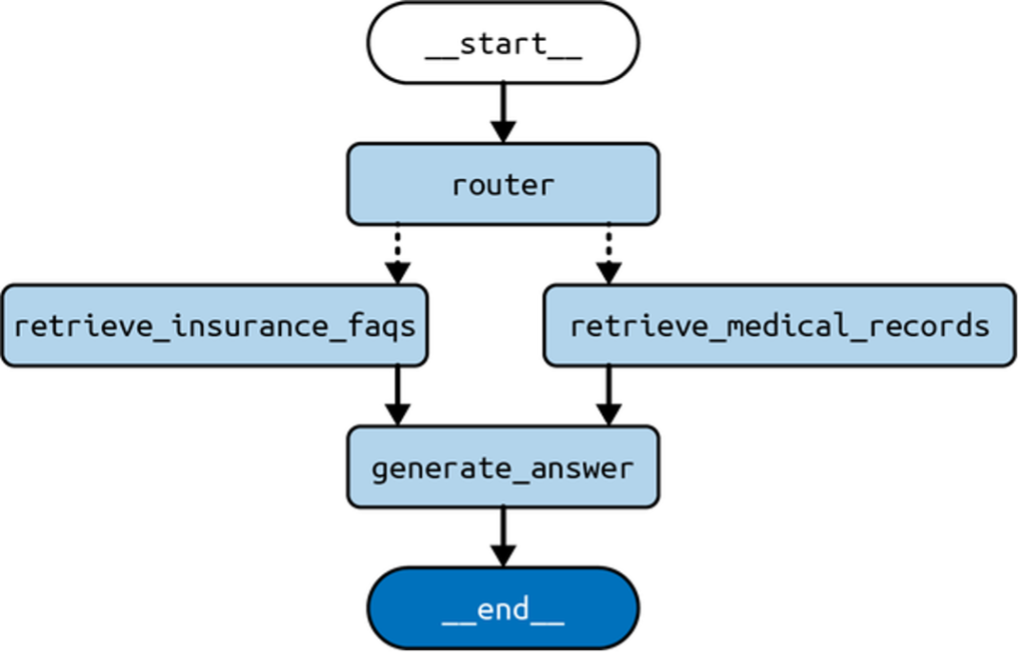
graph = builder.compile()The routing architecture becomes more versatile by allowing different paths through the structure. The LLM selects the domain via a conditional edge implemented in the pick function, directing the flow through either retrieval path. This is represented as dotted lines in Figure 2.
Example Input and Output
input = {
    "user": "Am I covered for COVID-19 treatment?"
}
for c in graph.stream(input):
print(c)Output Breakdown:
- Router Node: Determines the domain (
insurance) and updates the conversation history. - Retrieve Node: Extracts documents relevant to the query from the chosen index.
- Generate Node: Produces an answer based on the user query and retrieved documents.
This stream illustrates node outputs during a graph execution, tracing how the text processing flows from query routing to final response generation.
This concise guide conveys the function and practical application of the router architecture, offering a useful advancement for employing LLMs in dynamic query handling.
Summary
In this chapter, we explored a crucial trade-off in building LLM (Large Language Model) applications: agency versus oversight. An LLM application with more autonomy can perform more tasks independently, but this heightened agency requires robust mechanisms to control its actions. We then examined various cognitive architectures that achieve different balances between agency and oversight.
Chapter 6 delves into the most advanced cognitive architecture we’ve covered: the agent architecture.